
Pinterest board downloader

Pinterest Board Downloader

Fetch a public board, pick the pins you want, and download them together as a ZIP.

Process

How to download a Pinterest board

Resolve the board once, choose pins, then save a single ZIP archive.

  1. Paste the board link

    Paste the board link

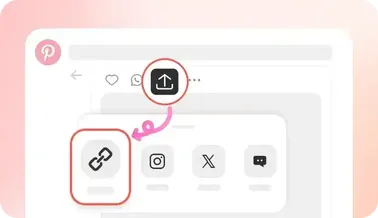
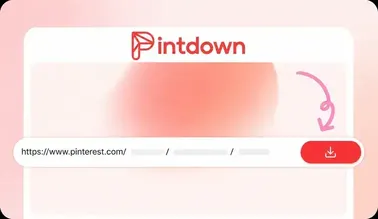
    Copy a public board URL from Pinterest and paste it into the shared search box.

  2. Open the board preview

    Open the board preview

    Continue to the preview page where we list every pin with thumbnails you can select.

  3. Download the ZIP

    Download the ZIP

    Choose pins on the preview page, then download a single ZIP to your device.

Benefits

Why use the board downloader

Bulk ZIP export

Collect many pins in one archive instead of downloading files separately.

Mixed media boards

Boards can include photos, videos, and GIFs—selected pins keep their media type.

Selective downloads

Skip pins you don’t need. Only checked items go into the ZIP.

Public boards only

We never ask for your Pinterest login. Secret boards stay inaccessible by design.

Tips

Board download best practices

Get cleaner ZIPs and fewer failed pins.

  • Use a full board URL that includes the username and board slug.
  • Deselect broken thumbnails before zipping to avoid empty files.
  • Large boards take longer—keep the tab open until the ZIP finishes.
  • For a single pin, use Video, Image, or GIF tools with the preview page instead.

How board download works

Open a public board on Pinterest and copy its URL. Paste it into pintdown.site/board and fetch the board. Select all pins or only the ones you want, then download a ZIP that includes the selected media files.

Images, videos, and GIFs together

Boards often mix photos, video pins, and animated GIFs. Selected items keep their media type in the ZIP whenever the source URL loads successfully. For a single pin with quality choices, use the video, image, or GIF tools instead.

Public boards only

Secret or private boards cannot be resolved without a Pinterest login, and PintDown never asks for your password. If a board fails to load, confirm it is public and that the URL includes the username and board name.

Tips for cleaner ZIP files

Deselect broken thumbnails before zipping, keep the tab open on large boards, and prefer full board URLs over shortened share text. When one pin fails inside the archive, download that pin alone from the matching single-pin tool.

Related guides

Full walkthrough for board ZIP downloads and limits:

FAQs

Pinterest board download FAQ

Yes for public boards. Fetch the board, select the pins you want, and download them as a ZIP.

No. Only public boards can be resolved without logging into Pinterest.

Yes. Selected video pins are included alongside images and GIFs when their media URLs load successfully.

CDN or CORS issues can block individual files. Re-fetch the board or download those pins with the single-pin tools.

Yes. There is no charge to resolve a public board or build a ZIP of selected pins.

Guides

Board download guides

ZIP workflow, secret-board limits, and large-board tips.