
Free · No signup · No watermark
Free Pinterest Downloader for Video, Image, GIF & MP3
One English-language hub for public Pinterest downloads. Pick the tool that matches your pin type—no signup, no PintDown watermark.
- Original quality media
- No watermarks added
- Works on iPhone & Android
How it works
How the hub works
Pick a tool, then paste a public link—no app install.
- 01
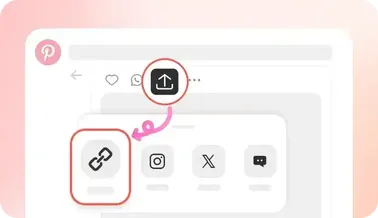
Copy Media Link
Navigate to your desired pin on Pinterest, click share, and select "Copy Link".
- 02
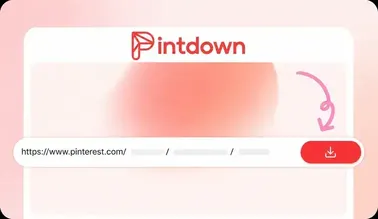
Paste into PintDown
Paste the copied URL link into the input box above.
- 03
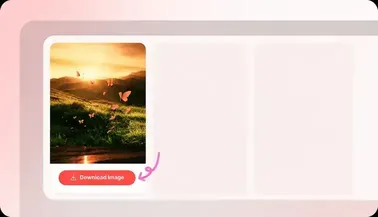
Save HD Media
Click Download, check the instant preview, and save to your local drive.
Features
Everything you need in one downloader
One tool for every Pinterest format, built to stay simple and fast.
Save Pinterest videos and Idea Pins as MP4, at original quality.
Download Pinterest photos at their full source resolution.
Grab looping Pinterest GIFs and motion pins in one click.
Extract audio from a video pin when a soundtrack exists.
Download a public board as a ZIP — up to 5 pins per download.
Files stay exactly as posted — PintDown never adds its own branding.
Paste a public link and download instantly. No account required.
Runs entirely in the browser — desktop, iPhone and Android.
Why PintDown
Why I built this
Solving the problems with typical downloaders
Real CDN resolutions
If Pinterest hosts a 1080p MP4, PintDown finds it instead of forcing a low-res fallback.
Maximum image sizes
Bypasses the compressed preview images to grab the original high-res upload.
True looping GIFs
Fetches the animated format natively so you don't lose the loop.
Fast Download
Paste a public pin link, preview the file, and save it to your device—no signup and no waiting list.
Free
Free for personal use with no credit card or account. Fair-use rate limits may apply to protect the service.
Works on Mobile
Fully mobile-optimized. Save directly to your iOS camera roll, Android gallery, or desktop.
Safe & Secure
We respect privacy. No user-uploaded image logs, tracking scripts, or software installations.
Smart detection
One input box handles everything. You don't need to know the pin type before pasting.
Comparison
Built without the usual downloader friction
See how PintDown compares to a typical Pinterest downloader site.
PintDown
RecommendedEvery format, without the extra steps.
- Downloads MP4 Videos
- Extracts Audio (MP3)
- Downloads Original Photos
- Downloads Animated GIFs
- Bulk Board Downloads
- No app installation required
- No user login required
Typical downloader sites
Common friction points with other Pinterest download tools.
- Multiple pop-ups or ad redirects before the file loads
- A separate site needed for every format
- Often adds its own watermark to the file
- Serves a compressed, lower-quality copy
- Requires signup or an app for full access
- No preview - you download blind
Use cases
When should you use PintDown?
Clear use cases and honest non-goals help you pick the right tool.
Best for
- Saving a public idea video as MP4 for offline reference
- Downloading original photos for mood boards or wallpapers
- Grabbing a short set of board pins as a selective ZIP
- Extracting a soundtrack from a public video pin as MP3
Not for
- Private accounts, secret boards, or login-walled pins
- Upscaling soft uploads to fake 4K
- Unlimited whole-board scraping in one ZIP
- Commercial redistribution without creator permission
Guides
Pinterest download guides
Step-by-step articles for iPhone, Android, boards, GIFs, and MP3 — linked from the tools they support.
View all guides- How to Download Pinterest Video on iPhone — Step-by-step guide to saving public Pinterest videos to your iPhone Photos library with PintDown—no app install and no Pinterest login.
- How to Download Pinterest Video on Android — Save public Pinterest videos to your Android Downloads or Gallery folder using Chrome and PintDown—no APK and no account required.
- Pinterest Video Download Not Working — Fixes — When a Pinterest video will not analyze or download, check private pins, incomplete links, network limits, and quality expectations—then retry with a full URL.
- How to Download a Pinterest Board as a ZIP — Fetch a public Pinterest board, preview pins, and download a ZIP with PintDown—including limits for large boards and secret boards.
- How to Extract Audio from a Pinterest Video (MP3) — Convert a public Pinterest video to MP3 with PintDown: when audio exists, when it does not, and how to choose a sensible quality.
- Pinterest GIF vs MP4: Why Pins Look Like Video — Why many Pinterest “GIFs” are MP4 loops, when to keep MP4, when to convert to GIF, and how PintDown handles each format for public pins.
- How to Save Pinterest Images to Your Phone — Save public Pinterest images to Android Gallery or iPhone Photos at the best available resolution using PintDown’s image tool.
FAQ
Frequently Asked Questions (FAQ)
Answers to common questions about downloading Pinterest media with PintDown.
No. PintDown is free for personal use with no premium paywall and no sign-up. Fair-use rate limits may apply so bots do not overload the service.
When you tap download on iOS, Safari saves it to your iCloud 'Downloads' folder. You can open the Files app, find the video or image, and tap 'Save Video' to move it to your Camera Roll.
Neither. When you paste a link, PintDown looks at the manifest file Pinterest serves to its own app. It simply extracts the highest resolution stream (usually 1080p or 720p) and gives you a direct download link.
Pinterest doesn't actually serve traditional GIFs. They convert them to looping MP4s because it saves bandwidth and plays smoother. PintDown fetches that exact looping video.
No. I don't run analytics on the URLs you paste, and I don't store the media files on my server. The tool just bridges your browser to Pinterest's CDN.
This tool is meant for personal inspiration boards and offline viewing. Downloading a video doesn't give you the copyright, so you shouldn't re-upload someone else's work without their permission.
Tools
More PintDown tools
Open the downloader that matches your pin, or read guides on the blog.
- Video DownloaderSave Pinterest videos as HD MP4
- Image DownloaderDownload photos in original quality
- GIF DownloaderKeep looping animated GIFs
- Board DownloaderZIP pins from a public board
- MP3 DownloaderExtract audio from video pins
- BlogGuides and tips for Pinterest downloads
- Abouttool_card_about_desc
- Contact Ustool_card_contact_desc