

Free Pinterest Downloader
Paste any public pin link to save videos, photos, and GIFs in one place.
How do I download Pinterest videos and images for free?
PintDown is your one-stop free tool for downloading Pinterest videos, high-resolution images, and animated GIFs in their original quality. Built for speed, privacy, and ease of use, it works on iOS, Android, desktop browsers, and tablets with no signup required.
Whether you are saving a DIY tutorial video, photo inspiration, or an animated GIF from a Pinterest board, PintDown auto-detects the pin type and delivers the highest-quality version available via fast CDNs from a single URL paste.
Designed for personal backup use only, PintDown prioritizes security: no download storage, no clipboard tracking, and no watermarks added to your files.
Prefer a focused tool? Use the Pinterest video downloader, image downloader, or read step-by-step guides on the PintDown blog.
How do I download from Pinterest?
Simple steps to download any Pinterest content
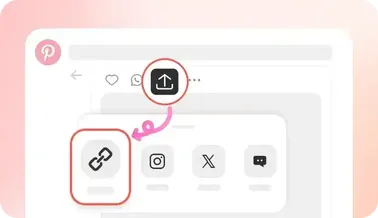
Copy Media Link
Navigate to your desired pin on Pinterest, click share, and select "Copy Link".
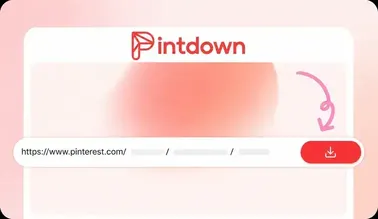
Paste into PintDown
Paste the copied URL link into the input box above.
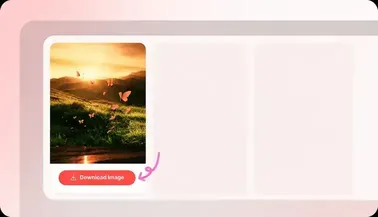
Save HD Media
Click Download, check the instant preview, and save to your local drive.
Why Choose PintDown?
Download Videos
Save Pinterest videos in HD quality with multiple resolution options

Download Images
Get high-resolution Pinterest photos in their original quality

Download GIFs
Save animated GIFs from Pinterest with no quality loss

Fast Download
No waiting lines. Extract and upgrade your images/videos in high definition in under a second.


100% Free
Free for personal use with no credit card or account. Fair-use rate limits may apply to protect the service.

Works on Mobile
Fully mobile-optimized. Save directly to your iOS camera roll, Android gallery, or desktop.

Safe & Secure
We respect privacy. No user-uploaded image logs, tracking scripts, or software installations.

Auto-Detect
Automatically detects if the pin is an image, video, or GIF
Frequently Asked Questions (FAQ)
Answers to common questions about downloading Pinterest media with PintDown.
Yes, PintDown is free with no hidden fees, subscriptions, or account registrations. Fair-use rate limits may apply; there is no paid tier for normal personal downloads.
Simply copy the Pin link on Pinterest, paste it into our downloader, and click Download. Once compiled, click the save button. On mobile devices, this will download directly into your files app or camera roll.
Absolutely! If the source Pin has multiple video streams, PintDown automatically parses them and displays selection options like 1080p, 720p, 480p, or 360p.
Pinterest compresses large GIFs into optimized MP4 formats to save bandwidth. We present these dynamic looping videos which play natively on all modern devices.
No. We do not keep a personal download history or clipboard log. Media is streamed for your transfer and not stored as a long-lived library on our servers.
Personal backup and offline viewing of public pins is the intended use. Commercial reuse or redistribution without the creator’s permission can violate copyright — always respect creators and Pinterest’s terms.
Related Pinterest tools
Video Downloader
Save Pinterest videos as HD MP4
Image Downloader
Download photos in original quality
GIF Downloader
Keep looping animated GIFs
Board Downloader
ZIP pins from a public board

MP3 Converter
Extract audio from video pins
Video Downloader
Save Pinterest videos as HD MP4
Image Downloader
Download photos in original quality
GIF Downloader
Keep looping animated GIFs
Board Downloader
ZIP pins from a public board
MP3 Converter
Extract audio from video pins
Video Downloader
Save Pinterest videos as HD MP4
Image Downloader
Download photos in original quality
GIF Downloader
Keep looping animated GIFs
Board Downloader
ZIP pins from a public board
MP3 Converter
Extract audio from video pins