
Pinterest Video Downloader icon

Pinterest Video Downloader

Paste a public Pinterest video pin URL, preview the stream, and download HD MP4 on iPhone, Android, or desktop — no signup and no app install.

HD to 4K when available
Standard MP4 output
Preview before you save
Process

Save any Pinterest video in three steps

Copy a video pin, open the preview, and pick the MP4 quality you want.

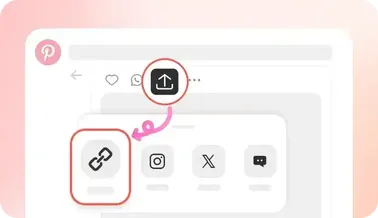
  1. Copy the video pin link

    Copy the video pin link

    Open the Pinterest video, tap Share, then Copy Link so you have the full pin URL.

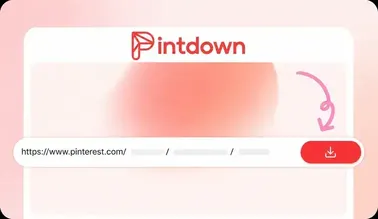
  2. Paste and open preview

    Paste and open preview

    Paste the link above and continue. PintDown analyzes the pin and shows an instant preview.

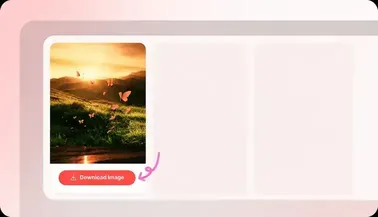
  3. Choose quality and save MP4

    Choose quality and save MP4

    Pick 360p–4K when available, then download the MP4 straight to your device.

Why PintDown

Why choose PintDown for Pinterest videos?

Built for creators who need clean MP4 files without installs or accounts.

Resolution you can pick

When Pinterest hosts multiple streams, choose the quality that fits your storage and screen.

Preview-first workflow

Confirm the clip on the preview page before the download starts—no surprise files.

Works in the browser

Safari, Chrome, Firefox, and Edge on phone or desktop. No app store downloads.

Benefits

Built for Pinterest video pins

Multiple resolutions

When Pinterest hosts several streams, choose the quality that fits your storage and screen.

Standard MP4 output

Every video saves as MP4 so it plays on iPhone, Android, Windows, Mac, and editors.

Preview before you save

Confirm the clip and title on the preview page before you start the download.

Phone and desktop ready

Works in Safari, Chrome, Firefox, and Edge—no app install required.

Formats

Supported video formats

What you get when you download a Pinterest video pin.

  • MP4 video files compatible with most players and social apps
  • Resolution options from SD up to Full HD or 4K when the source supports it
  • Optional MP3 audio extraction when the pin includes sound
Tips

Pinterest video download tips

Get cleaner saves and fewer failed requests.

  • Copy the full /pin/ URL from Share → Copy Link, not a truncated caption.
  • On iPhone, save the MP4 from Files or Photos after the browser finishes downloading.
  • If quality looks soft, the original upload was already compressed—PintDown cannot upscale it.
  • Private or deleted pins cannot be fetched. Switch to a public video pin and retry.
Privacy

Privacy & security for video downloads

What happens when you paste a video pin link.

  • We do not ask for your Pinterest password or account.
  • Downloaded MP4s are not kept on PintDown servers after the transfer.
  • Use downloads for personal offline backup and respect creator copyright.
FAQs

Pinterest video download FAQ

PintDown lists every stream Pinterest exposes for that pin. You pick the label you want—often 720p, 1080p, or higher when the creator uploaded it that way.

Videos download as MP4. That format opens in gallery apps, desktop players, and most editing tools without conversion.

Yes. Copy the pin link in the Pinterest app, paste it into PintDown in Safari or Chrome, open the preview, and save the MP4 to Files or Photos.

Private, deleted, or region-blocked pins cannot be fetched. Double-check you copied a public pin URL, then try again.

No. Files stream from Pinterest’s CDN without an extra watermark from PintDown.

Saving videos on your specific device

On iPhone, open the Pinterest app, tap the share icon on a video pin, choose Copy Link, then paste it into PintDown in Safari or Chrome — the MP4 downloads and saves to your Files app or camera roll. On Android the same steps work in Chrome, and you can pick where the file is stored. On a Windows or Mac computer, paste the link into any desktop browser and the video saves to your Downloads folder. No step differs between devices except where the finished file lands.

Troubleshooting common download issues

If a link fails, first make sure you copied the full pin URL and not a shortened share text. Videos that will not download are usually private, deleted, or from an account that blocks external fetching. Waiting a few minutes and retrying often works when Pinterest is temporarily rate-limiting requests. If the saved file looks low quality, it means the original upload was already compressed on Pinterest, since PintDown always pulls the best version available.

What to do with your saved videos

Once a video is on your device you can watch it offline on a plane or subway, clip a favorite moment into a shorter edit, or drop it into a presentation without needing the Pinterest app open. Because the file is a standard MP4, it opens in any player and uploads to editing tools without conversion. Just remember that reusing someone else's video publicly still means respecting their copyright, so keep personal-use saves personal unless you have permission.

Related guides

Device and troubleshooting guides that support this video tool:

Guides

Related video guides

Step-by-step help for common devices and workflows.